Your next shift, right on the Lock Screen.
Bonsol is the shift calendar that answers before you ask: when you work, when you're both off, and what you'll earn. You don't even have to open it.
Coming soonto the App Store
For iPhone. No ads, no login.
We read 4,079 bad reviews of shift apps.
The same complaints keep coming back. Bonsol is built so you never have them.
Ads get in the way when you just want to see your shift.
522 reviews
Bonsol has no ads. It opens right on today's shift.
The rota or notes are gone after an update or a new phone.
443 reviews
Your rota lives on your phone. The backup is one file you take with you.
The widget disappeared, or shows nothing.
261 reviews
Your next shift is on the Lock Screen, and a Live Activity counts down before it starts.
Shifts move by a day, or get the wrong time.
144 reviews
Change your rota from a date you choose. Shifts that have passed stay put.
Reviews with 1–3 stars of 17 shift apps in the App Store, 14 countries, read in November 2026.
When are you both off?
Pick a rota. Bonsol puts your partner's shifts next to yours and finds the days for you.
Sam works days on weekdays. The day after a night shift is for sleeping, so it doesn't count as a day off.
Three questions. One glance.
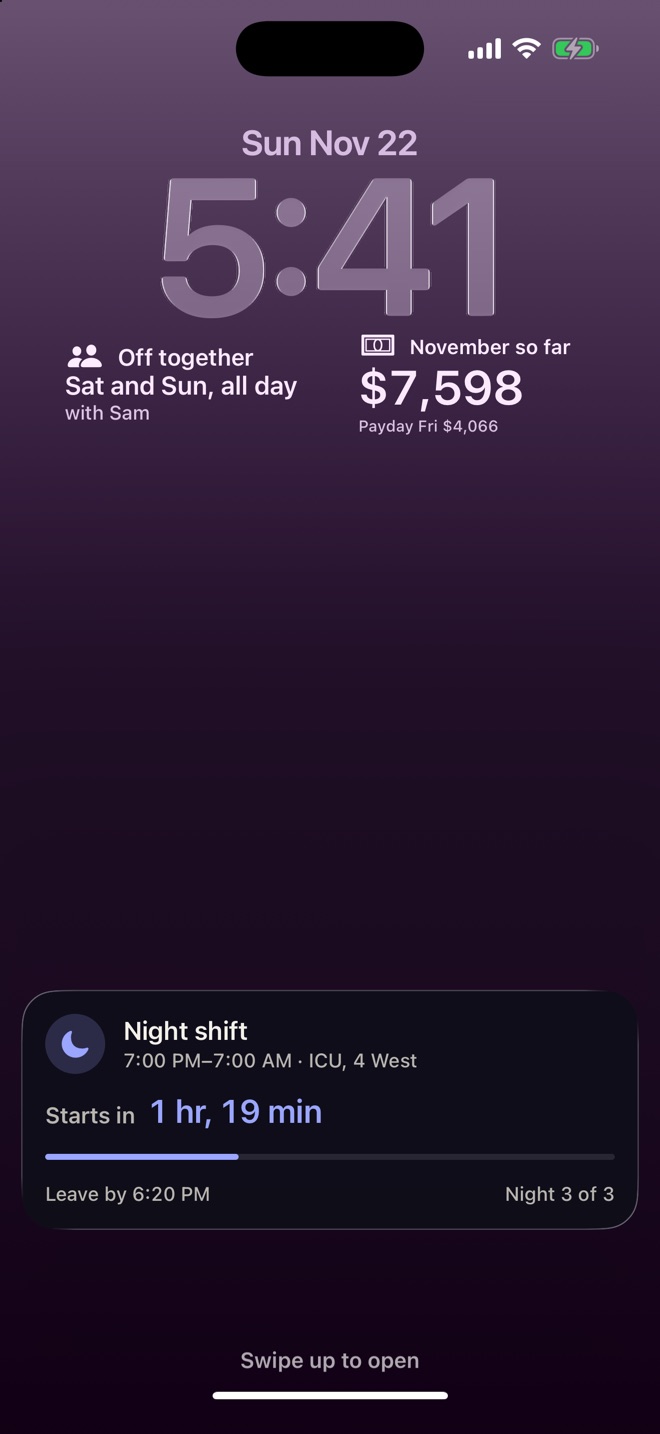
When do I work?
A Live Activity starts by itself before your shift and counts down. Widgets show the rest.
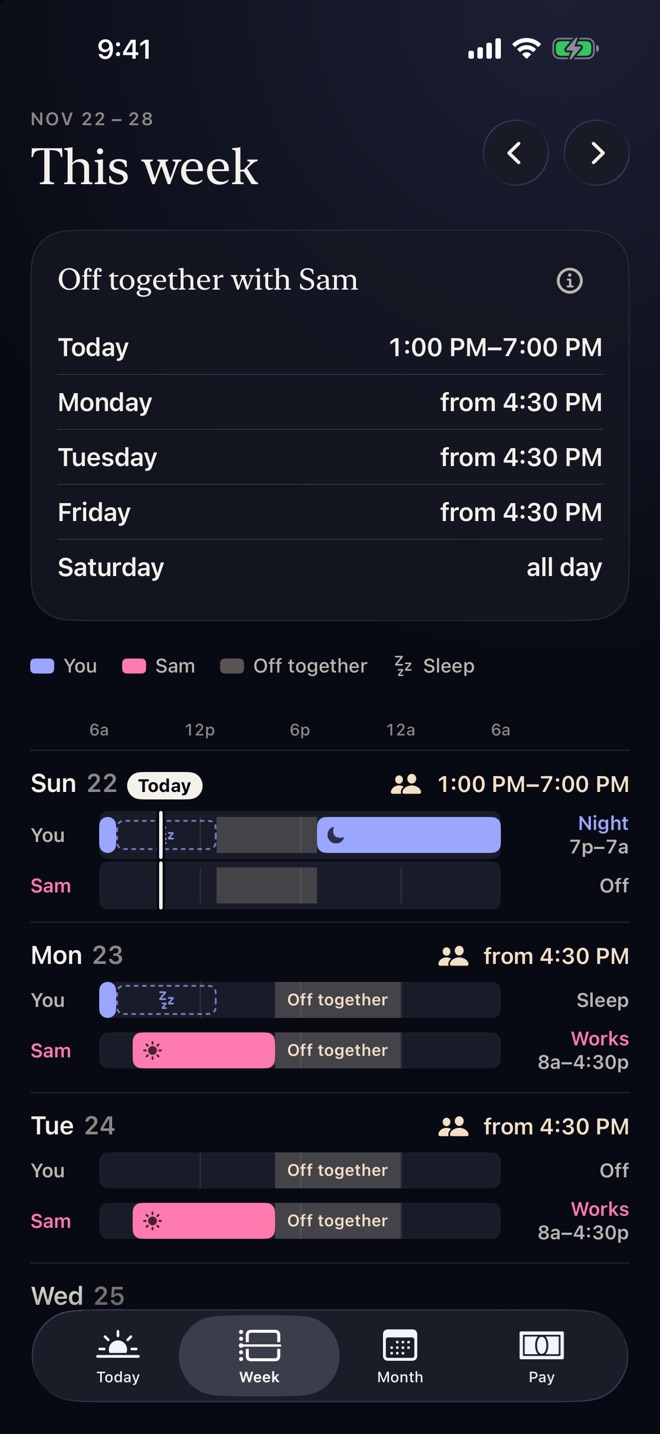
Are we off at the same time?
Your partner's week next to yours. Sleeping after a night shift doesn't count as a day off.
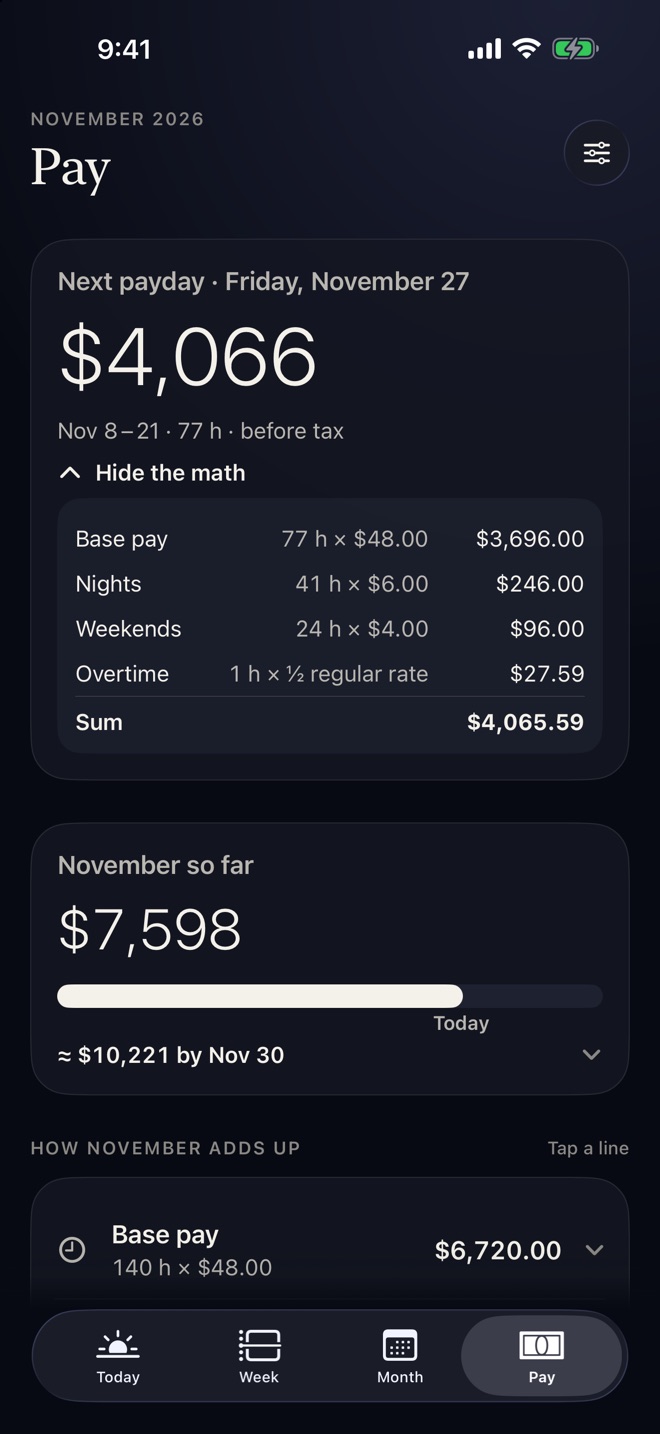
What will I earn?
Evenings, nights, weekends and overtime. Tap an amount to see the math.
Compared with the seven biggest.
What Bonsol has, and what the others charge for.
| Bonsol | The seven biggest shift apps | |
|---|---|---|
| Live Activity before your shift | Yes, starts by itself | None of the seven |
| Next shift on the Lock Screen | Yes | One of seven |
| Ads | None | Three of seven |
| Share your shifts with your partner | Free | Paid in five of seven |
| Your shifts in Google Calendar and Outlook | Free calendar link | Paid in at least three of seven |
| Backup | Free, in one file | Paid in at least three of seven |
| All the months ahead | Free | Paid in two of seven |
Supershift, Shift Day, Shifter, Megashift, My Shift Planner, Shift Work Calendar and Shifty, as they were in the App Store on November 22, 2026.
Most of it is free.
This is yours without paying anything:
- Your rota and all the months ahead
- Widgets, Lock Screen and Live Activity
- An alarm before your shift, and “Hey Siri, when do I work?”
- Days off together with one partner
- A calendar link, and your shifts in the Calendar app
- Backup, sync between your own devices, and export
- Notes, hours and overtime hours
- Your first import from a PDF or a picture
Bonsol Pro
Pay with the math, importing more rotas, more jobs, and more people than one partner.
Ready in a minute.
You don't need to know when your cycle started.
Pick your job
Nursing, police, fire, retail, industry or offshore.
Pick the rota that looks like yours
2-2-3, DuPont, 24/48, 7 on 7 off and over 40 more.
Slide it until the weeks match
“Is this your rota?” Yes, and you're done.
Have your rota as a PDF or a screenshot? Import it and tap your row.
Your shifts are yours.
Bonsol works offline and without a login. Your rota stays on your phone. If you share it, only the shifts are sent.
- No ads and no tracking
- Pay and notes stay with you, even when you share your shifts
- Export to Calendar, Google, Outlook and spreadsheets
- Backup in one file, and restore on a new phone
Questions
Does Bonsol work with my rota?
Bonsol has over 40 patterns for hospitals, police, fire, industry and offshore. If yours isn't there, draw 14 days yourself, or import your rota from a PDF or screenshot.
My partner has Android. Does that work?
Yes. Send a calendar link from Bonsol. It works in Google Calendar, Outlook and other calendars, and updates by itself. You can stop the link at any time.
What happens to my shifts if I get a new phone?
Make a backup in one file, and restore it on the new phone. Nothing newer is overwritten.
Which phones does it work on?
iPhone with iOS 26 or later.
I need help
Write to hi@bonsol.app, or see Support.

See your next shift without looking for it.
Coming soonto the App Store